VBA Letter Casing Nightmare Fixed in VCS Addin v5+
Do you write it `SQL` or `Sql` or `sql`? With v5 of the VCS Addin, you can choose one (and enforce it!) so Git will stop hassling you.


If you've used version control with Access, you know exactly what I'm talking about.
VBA's case-changing "feature" updates every instance of an identifier project-wide (regardless of the identifier's actual scope) whenever its casing is changed in a declaration line:
 Mike Wolfe
The Brute Force "Fix"
I tried many approaches for working around this issue, but finally settled on a bit of a brute-force approach, which I wrote about here:
 Mike Wolfe
The tl;dr of the above article is that you can "enforce" letter casing by maintaining a class module with your canonical casing choices preserved in line-trailing comments (VBA's global case-changing feature doesn't touch comments), as seen here:
' The comment contains the canonical letter-casing
Dim a 'a
Dim b 'b
Dim errHandler 'ErrHandler
Dim Rs 'rs
Dim SQL 'SQL
Dim SQLInsert 'SqlInsert
Dim X 'x
Dim Y 'y
To actually apply these changes, I wrote a companion function (StandardizeLetterCasing) that rewrites each line in the class module when necessary to restore the canonical casing from the trailing line comment. The catch? You need to call that function just before you export your code to source control.
VCS Add-in v4 Workaround
In version 4 of the VCS add-in, I called that function from the "Run Sub Before Export" option:
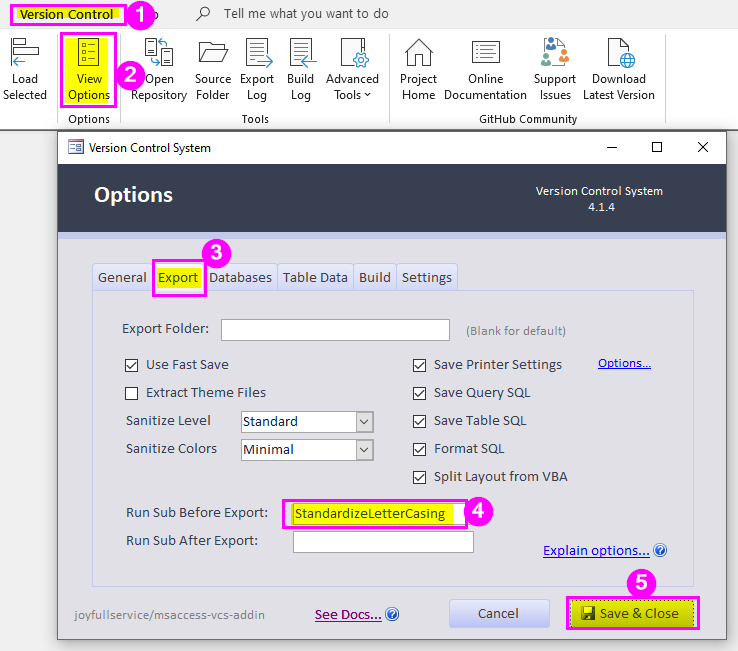
Native Support in VCS v5+
I'm thrilled to say that this feature is now built into v5 of the VCS addin.
Here's the commit message from project maintainer Adam Waller (emphasis added):
Implement lEtErCaSiNg function from Mike Wolfe
After reviewing various approaches on handling the letter casing issues with VBA, I settled on a simple integrated approach that calls a function before export and after build to enforce the user's rules for letter casing as defined in a specially named class module. If this class does not exist in the current project, it does nothing. To use this built-in functionality, simply add a "clsStandardLetterCasing" class to your project as described in https://nolongerset.com/standardizelettercasing/ See #599
Quick Start Guide
- Download and install v5+ of the MS Access VCS Add-in
- Add a new class module named
clsStandardLetterCasing* - Copy and paste the sample code from above (
Dim a 'a, etc.)
That's it!
*No, you can't customize the name.
Building the List of Identifiers
Now, I do NOT recommend going through your source code and building an exhaustive list of every identifier.
Instead, simply fill out the class module as you get false positives when exporting your source files. For example, the first time you type Dim Db As Database and you get a bunch of lines like this in your Git diff...
-    Dim db As Database
+    Dim Db As Database
...go back to your clsStandardLetterCasing module and add the following line...
Dim db 'db...then Export to Source again.
All those spurious Git diff lines will go away forever! And you'll never have to worry about the casing of that particular identifier again.
In practice, I've been surprised at how small my list of identifiers has been. If you stick to a strong letter-casing convention (I like to PascalCase All the Things), then most of your issues will be around those few identifiers that are at the margins of your convention (e.g., Sql vs. SQL vs. sql).
Choose one, add a line to clsStandardLetterCasing, and never worry about it again.

