Bug Alert: Font Issues, Shrunken PDF Exports, and Hard Crashes
Sudden font issues in your Access forms? PDF report exports way too small? You may be suffering from the latest Microsoft Access bugs.

My friends and fellow MVPs over at AccessForever.org (AFo) have been gathering recent error reports from around the web related to Access 2607 and 2608:
 Karl Donaubauer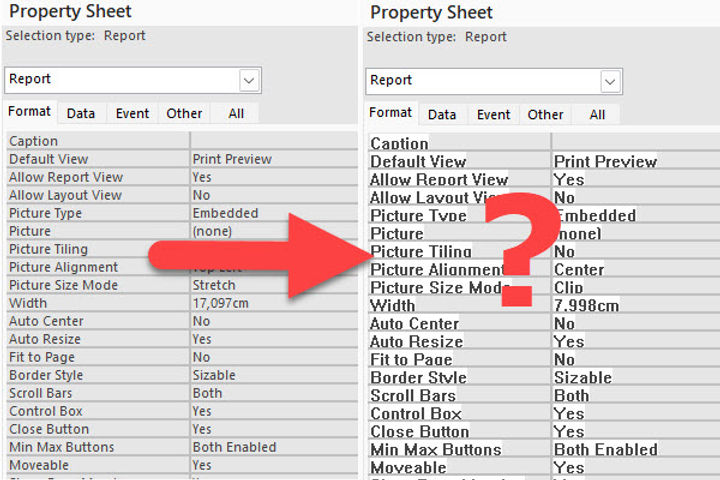
Symptoms Observed in the Wild
The problem manifests itself in several ways, including:
- The blocky "System" font replacing custom fonts (even in the built-in Property Sheet itself)
- Unexplained hard crashes at application start-up
- Margins being changed when exporting reports to PDF
- Some pages of multi-page reports printing at 1/4 size when exported to PDF
- Solid backgrounds showing behind text on controls that should have a transparent background
Root Cause Unknown
The Microsoft Access team is aware of the issues, but the root cause has not yet been identified as of this writing (2026-08-23). One theory floated at AFo is that this is a byproduct of a Windows Security update.
The Access team has also been working on rolling out the new zooming feature in phases. If I had to guess, I would imagine some of the work on those features may have had some unintended consequences.
Or it could be both explanations. Perhaps a recent security update is blocking whatever method Access is using to load fonts. And maybe an implementation of the zoom feature has a weird corner case when exporting certain report pages to PDF.
Workaround
For now, the best-known workaround (if you are experiencing these issues) is to roll back to Office 2606.
Peter Doering
Exact Command to Run to Roll Back to 2606
The roll-back article above lists several approaches for rolling back to a previous working Office version, but it is generic advice. Here are the exact commands for rolling back to Version 2606 of the Current Channel, which should be what most readers need. The commands should work with both cmd and powershell.
Be sure to read the full article above if the commands below don't work or if you have special needs (e.g., if you are on the Enterprise Channel for releases).
64-bit Office 365 Roll Back Commands
Run the following in an Admin terminal:
cd "C:\Program Files\Common Files\microsoft shared\ClickToRun\"
.\OfficeC2RClient.exe /update user updatetoversion=16.0.20131.20154
32-bit Office 365 Roll Back Commands
Run the following in an Admin terminal:
cd "C:\Program Files (x86)\Common Files\microsoft shared\ClickToRun\"
.\OfficeC2RClient.exe /update user updatetoversion=16.0.20131.20154
Watch AccessForever.org for Updates
The AFo website is managed by multiple Microsoft Access MVPs (spanning multiple time zones). Collectively, they spend a great deal of time monitoring Access forums and answering questions. That website is the best resource for the latest news and updates on this bug and many others.

UPDATE [2026-08-24]: Added copy-paste commands to roll back to current channel version 2606 as it's the most common workaround path for now.

