> ## Content Index
> Fetch the complete content index at: https://nolongerset.com/llms.txt
> Use this file to discover other available public pages before exploring further.
# XmlWrap() Function
- URL: https://nolongerset.com/xmlwrap-function/
- Published: 2022-06-22T03:59:00.000Z
- Updated: 2026-05-08T12:56:52.000Z
- Description: This convenience function helps you write more readable code when building Office Ribbon-flavored XML strings.
- Author: Mike Wolfe
- Tags: Code Library, #StringFunctions, Convenience Functions, Ribbon, #Import 2026-05-20 02:59
I use this convenience function to build custom ribbon XML.
I'm sure it could be used in other XML scenarios, but you have to be careful. The function introduces whitespace for readability of the resulting XML. This is not a problem for Office ribbon XML, as the whitespace is *insignificant*. The same may not be true for other flavors of XML.
I use the term "convenience function" to refer to simple functions that don't necessarily save you any lines of code, but that make your existing code easier to read.
## Office Ribbon XML
Here's a sample of some ribbon XML from the [Microsoft documentation](https://docs.microsoft.com/en-us/previous-versions/office/developer/office-2007/aa338202%28v=office.12%29#general-format-of-xml-markup-files):
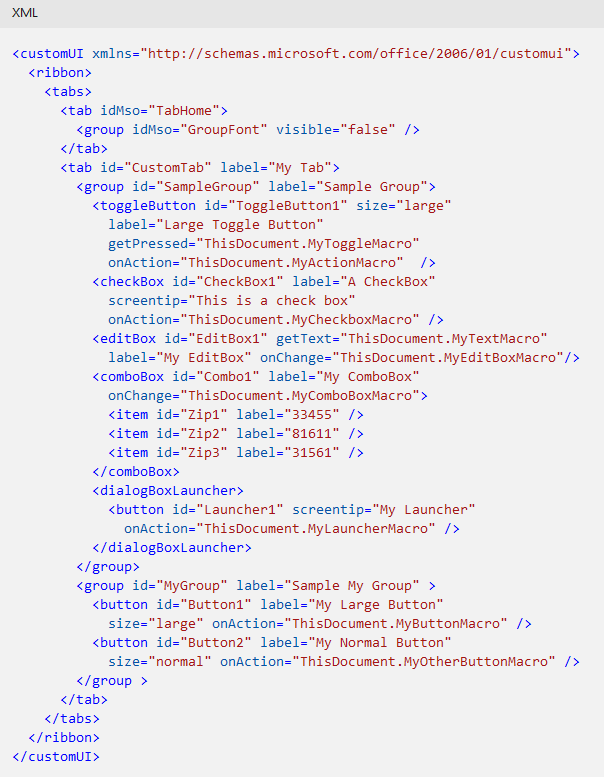
Notice in the above screenshot how there is no XML *content*; everything is either a start tag, an end tag, or an empty element tag (e.g., ``). This is why we don't have to worry about whitespace impacting the functionality of our ribbon XML.
As a result, we can safely use whitespace as we see fit to generate more human-readable XML markup.
## Benefits of the XmlWrap() Function
Let's look at two different ways to generate the following text:

The first `Xml =` line shows how to create the above text with basic string concatenation. The second `Xml =` uses my `XmlWrap()` function instead.
```vba
Const InnerXml As String = ""
Xml = "" & vbNewLine & _
vbTab & InnerXml & vbNewLine & _
""
' vs.
Xml = XmlWrap(InnerXml, "tab", "idMso=""TabHome""")
```
There are a few benefits to this function:
- Guarantees that the opening and closing tags match
- Avoids typos
- Enforces consistent whitespace
- Automatically creates an empty element tag if there is no text to wrap
These benefits become clearer when you begin to incorporate the function into a more complex scenario, such as my ribbon XML builder class module.
## Sample Usage
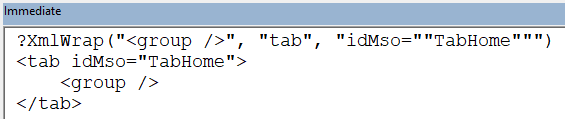
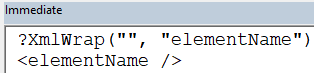
If there is no content to wrap, the function saves space by creating an empty-element tag instead of opening and closing tags.
## The Code
```vba
'>>> XmlWrap("", "elementName")
'
'>>> XmlWrap("", "elementName")
'`n`t`n
'>>> XmlWRap("", "elementName", "font=""Arial""")
'
Function XmlWrap(TxtToWrap As String, _
ElementName As String, _
Optional Attrs As String) As String
Dim TagText As String
TagText = Conc(ElementName, Attrs, " ")
If Len(TxtToWrap) = 0 Then
XmlWrap = "<" & TagText & " />"
Else
Dim IndentedTxtToWrap As String
IndentedTxtToWrap = vbTab & Replace(TxtToWrap, vbNewLine, vbNewLine & vbTab)
XmlWrap = "<" & TagText & ">" & vbNewLine & _
IndentedTxtToWrap & vbNewLine & _
""
End If
End Function
```
### Dependencies
- The [Conc() function](https://nolongerset.com/come-together/) which I use to concatenate strings.
- The usage examples shown in the `'>>>` comments are verifiable [DocTests](https://nolongerset.com/python-inspired-doc-tests-in-vba/).
---
### Referenced articles
[Come TogetherDo you build strings in loops? Stop trimming the delimiter at the end of the loop. There’s a better way.No Longer SetMike Wolfe](https://nolongerset.com/come-together/)
[Python-inspired Doc Tests in VBADoc tests are not a replacement for unit or integration testing. But they do provide the best return on investment (ROI) of any type of test, mostly because the effort to write them is near zero.No Longer SetMike Wolfe](https://nolongerset.com/python-inspired-doc-tests-in-vba/)
*Image by [donations welcome](https://pixabay.com/users/stux-12364/?utm%5Fsource=link-attribution&utm%5Fmedium=referral&utm%5Fcampaign=image&utm%5Fcontent=2478096) from [Pixabay](https://pixabay.com/?utm%5Fsource=link-attribution&utm%5Fmedium=referral&utm%5Fcampaign=image&utm%5Fcontent=2478096)*
***UPDATE*** *\[2022-06-23\]: Added Dependencies section with link to Conc() function article.*