> ## Content Index
> Fetch the complete content index at: https://nolongerset.com/llms.txt
> Use this file to discover other available public pages before exploring further.
# TagWrap() Function
- URL: https://nolongerset.com/tagwrap-function/
- Published: 2022-06-21T02:21:33.000Z
- Updated: 2026-05-08T12:56:54.000Z
- Description: This convenience function helps you write more readable code when building strings with HTML-style opening and closing tags.
- Author: Mike Wolfe
- Tags: Code Library, #StringFunctions, Convenience Functions, #Import 2026-05-20 02:59
I use this *convenience* function to add opening and closing HTML-style tags to another string.
I use the term "convenience function" to refer to simple functions that don't necessarily save you any lines of code, but they make your existing code easier to read.
```vba
Html = "" & FirstName & ""
' vs.
Html = TagWrap(FirstName, "b")
```
There are a few benefits to this function:
- Guarantees that the opening and closing tags match
- Avoids typos, such as `Html = ""`
- Much easier to read when nested, e.g.:
`Html = TagWrap(TagWrap(FirstName, "b"), "i")`
These benefits become clearer when you begin to incorporate the function into a more complex procedure.
## Sample Usage
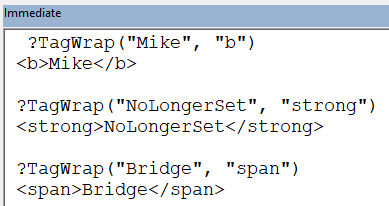
## The Code
NOTE: The usage examples shown in the `'>>>` comments below are verifiable [DocTests](https://nolongerset.com/python-inspired-doc-tests-in-vba/).
```vba
'>>> TagWrap("Mike", "b")
'Mike
'>>> TagWrap("Mike", "strong")
'Mike
Function TagWrap(TxtToWrap As String, Tag As String) As String
TagWrap = "<" & Tag & ">" & TxtToWrap & ""
End Function
```
*Image by [Alexas\_Fotos](https://pixabay.com/users/alexas%5Ffotos-686414/?utm%5Fsource=link-attribution&utm%5Fmedium=referral&utm%5Fcampaign=image&utm%5Fcontent=1745887) from [Pixabay](https://pixabay.com/?utm%5Fsource=link-attribution&utm%5Fmedium=referral&utm%5Fcampaign=image&utm%5Fcontent=1745887)*