> ## Content Index
> Fetch the complete content index at: https://nolongerset.com/llms.txt
> Use this file to discover other available public pages before exploring further.
# 3 Ways to Run the Best Low-Level Windows Debugging Tool
- URL: https://nolongerset.com/how-to-run-procmon/
- Published: 2021-07-21T03:35:00.000Z
- Updated: 2026-05-08T12:34:34.000Z
- Description: A surprising number of thorny Access performance issues can be resolved with this venerable tool. Here's how to get started with Process Monitor.
- Author: Mike Wolfe
- Tags: Tools, Debugging, Advanced, #Import 2026-05-20 02:59
My favorite low-level debugging tool is Process Monitor (aka, procmon). It's a part of the [Sysinternals Utilities suite](https://docs.microsoft.com/en-us/sysinternals/) written by Mark Russinovich.
## Getting Started
If you've never used Process Monitor before, it can be very overwhelming at first. To get started, I recommend watching one or more videos from Mark Russinovich himself.
[Mark's Webcasts](https://docs.microsoft.com/en-us/sysinternals/resources/webcasts) are a series of 75-minute presentations from 2010 through 2015\. The structure of all six talks is the same, but the examples he uses are different each time.
I scanned through the Process Monitor portion of each talk to save you from having to watch seven and a half hours of video.
To get the best bang for your buck, I recommend you watch [Mark's 2015 talk](https://youtu.be/WbIYw0tKqm8?t=1890). The section on Process Monitor starts at the 31:30 mark.
## Running Process Monitor
One nice thing about the Sysinternals Utilities is that they do not need to be installed. Everything you need is packed into a tiny little .exe file.
There are at least three ways to install Process Monitor. All three options support downloading the entire Sysinternals suite of utilities or a standalone copy of Process Monitor.
### Traditional download site
The official download site for the Sysinternals utilities is here:
### Chocolatey
I mentioned the [chocolatey](https://chocolatey.org/) Windows package manager in a [previous article](https://nolongerset.com/my-favorite-things/).
Here's the command to install the standalone Process Monitor utility:
```
choco install procmon
```
Here's the command to install the entire Sysinternals suite (this is what I use):
```
choco install sysinternals
```
### Sysinternals Live
I just learned about this option while putting together this article.
> Sysinternals Live is a service that enables you to execute Sysinternals tools directly from the Web without hunting for and manually downloading them. Simply enter a tool's Sysinternals Live path into Windows Explorer or a command prompt as live.sysinternals.com/ or \\\\live.sysinternals.com\\tools\\.
>
> You can view the entire Sysinternals Live tools directory in a browser at [https://live.sysinternals.com/](https://live.sysinternals.com).
This sounded so cool I had to try it for myself.
#### Via File Explorer
Honestly, I was more than a little underwhelmed when I ran it from File Explorer. It amounted to little more than an easy to remember URL.
The usual web browser dialog box asking to save or run the executable popped up.
I typed the following into the File Explorer address bar:
**live.sysinternals.com/procmon.exe**
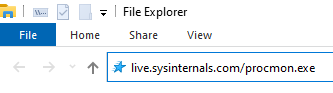
When I pressed enter, Windows simply downloaded the file via my default web browser (currently Firefox):
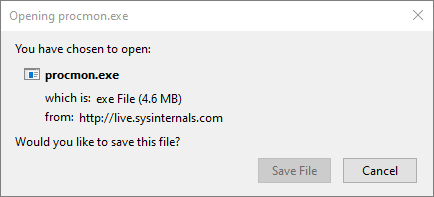
The URL is case-insensitive, but I got a 404 file not found error if I left off the ".exe" extension:

The File Explorer integration was nice, but it was nothing special.
#### Via Cmd Window
OK, now this really was cool. I opened a non-admin cmd window and entered several commands to open a series of Sysinternals utilities:
- [Process Monitor](https://docs.microsoft.com/en-us/sysinternals/downloads/procmon): `\\live.sysinternals.com\tools\procmon`
- [Process Explorer](https://docs.microsoft.com/en-us/sysinternals/downloads/process-explorer): `\\live.sysinternals.com\tools\procexp`
- [Autoruns](https://docs.microsoft.com/en-us/sysinternals/downloads/autoruns): `\\live.sysinternals.com\tools\autoruns`
- [RAMMap](https://docs.microsoft.com/en-us/sysinternals/downloads/rammap): `\\live.sysinternals.com\tools\rammap`
- [Handle](https://docs.microsoft.com/en-us/sysinternals/downloads/handle): `\\live.sysinternals.com\tools\handle {locked file name}`
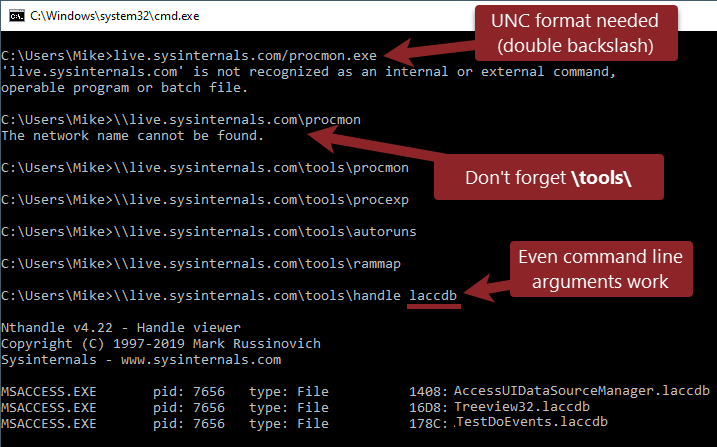
Some quick notes about the cmd window usage:
- You need the leading double backslashes (not used with File Explorer).
- You need the **tools** folder (optional with File Explorer).
- You can pass command line arguments to tools that accept them, like the [Handle utility](https://docs.microsoft.com/en-us/sysinternals/downloads/handle).
---
### External links
[Windows Sysinternals - Windows SysinternalsLibrary, learning resources, downloads, support, and community. Evaluate and find out how to install, deploy, and maintain Windows with Sysinternals utilities.Microsoft Docsmarkruss](https://docs.microsoft.com/en-us/sysinternals/)
[Mark’s Webcasts - Windows SysinternalsMark’s webcastsMicrosoft Docsmarkruss](https://docs.microsoft.com/en-us/sysinternals/resources/webcasts)
[The Case of the Unexplained: Windows TroubleshootingDatabase Migrations could range from a very easy migration project to lengthy cross platform migrations. Many times, DBAs and Database…Channel 9Mark Russinovich](https://channel9.msdn.com/events/ignite/2015/brk3316)
Ignore the description of the talk. It's not about Database Migrations. Mark pokes fun at the conference organizer's error in his opening slide.
[Sysinternals Utilities - Windows SysinternalsEvaluate and find out how to install, deploy, and maintain Windows with Sysinternals utilities.Microsoft Docsmarkruss](https://docs.microsoft.com/en-us/sysinternals/downloads/)
The official download site.
[Chocolatey - The package manager for WindowsChocolatey is software management automation for Windows that wraps installers, executables, zips, and scripts into compiled packages. Chocolatey integrates w/SCCM, Puppet, Chef, etc. Chocolatey is trusted by businesses to manage software deployments.Chocolatey Software](https://chocolatey.org/)
### Sysinternals Utilities
[Process Monitor - Windows SysinternalsMonitor file system, Registry, process, thread and DLL activity in real-time.Microsoft Docsmarkruss](https://docs.microsoft.com/en-us/sysinternals/downloads/procmon)
[Process Explorer - Windows SysinternalsFind out what files, registry keys and other objects processes have open, which DLLs they have loaded, and more.Microsoft Docsmarkruss](https://docs.microsoft.com/en-us/sysinternals/downloads/process-explorer)
[Autoruns for Windows - Windows SysinternalsSee what programs are configured to startup automatically when your system boots and you login.Microsoft Docsmarkruss](https://docs.microsoft.com/en-us/sysinternals/downloads/autoruns)
[RAMMap - Windows SysinternalsAn advanced physical memory usage analysis utility that presents usage information in different ways on its several different tabs.Microsoft Docsmarkruss](https://docs.microsoft.com/en-us/sysinternals/downloads/rammap)
[Handle - Windows SysinternalsThis handy command-line utility will show you what files are open by which processes, and much more.Microsoft Docsmarkruss](https://docs.microsoft.com/en-us/sysinternals/downloads/handle)
### Referenced articles
[My Favorite ThingsHere is a list of my favorite utilities, add-ins, OCX controls, and applications that I use when developing Microsoft Access applications.No Longer SetMike Wolfe](https://nolongerset.com/my-favorite-things/)
***UPDATE*** *\[2023-07-31\]: Fix broken link to Mark Russinovich's 2015 video.*